
Triark ShipDoc
Current documents on board
Triark ShipDoc gives the crew the technical documentation and procedures in their current version. Documents are managed in Triark EDM and synced to the vessel.
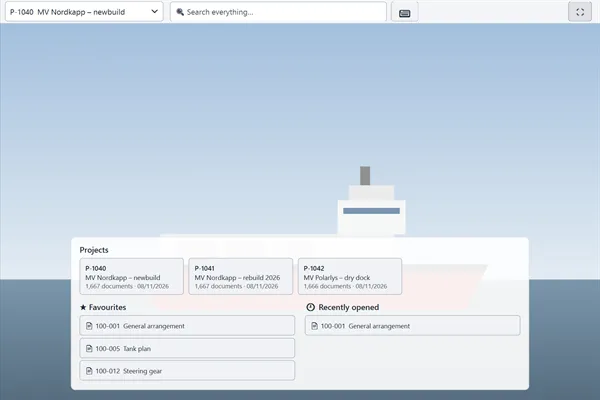
Built for life on board
The crew needs the right drawing or procedure where the work happens, even when the vessel is far from shore.
Works offline
The whole library is stored on board. No connection is needed to find a document.
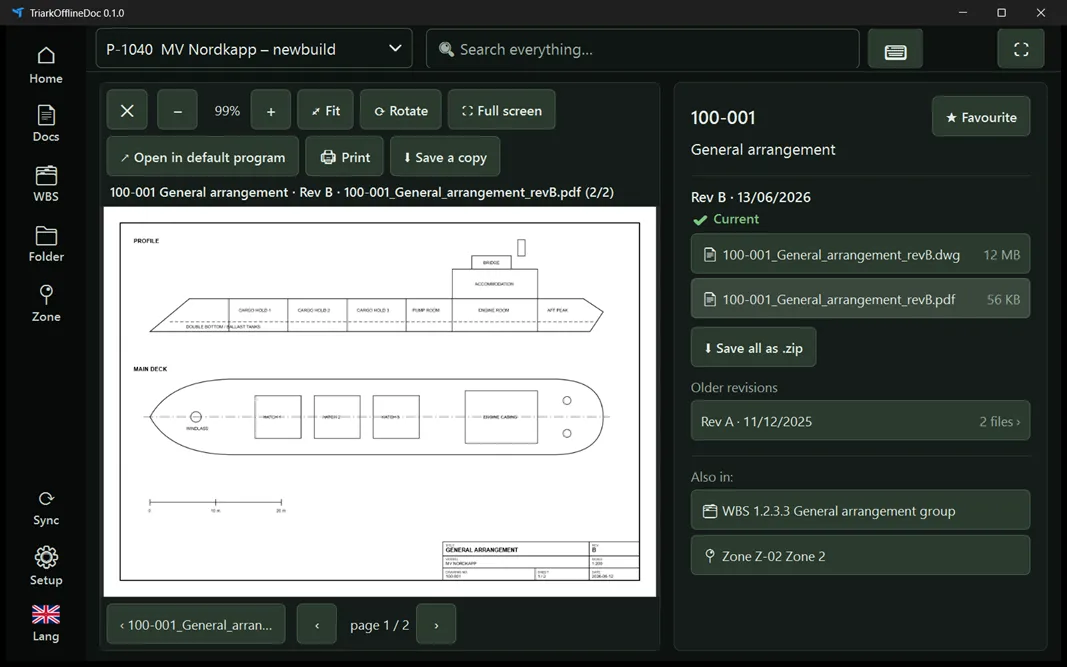
Current revision
Older revisions are marked as superseded. Removed documents are kept and marked as voided, so nothing disappears without a trace.
Controlled updates
When the vessel is online, ShipDoc can synchronize. Changes to the library are written to a change log available for audit.
Find it fast
Search across all documents and files, or browse by document, SFI, zone or folder structure.
One EDM. The whole fleet.
The office manages documents in Triark EDM. With Triark ShipDoc, each vessel has its own documents on board.
Office · Triark EDM
- PR-210Anchor handlingRev D
- FP-001Fire control planRev B
- PD-811Ballast systemRev F
- PD-631Cargo systemRev C
Try it: publish a new revision. It goes only to the vessel the document belongs to. Tap a vessel to take it offline.
Runs where you need it
In the engine room: a wall-mounted touch panel locked in kiosk mode. Documents found in seconds, right where the work is.
Optional screens on board
- Dedicated touch screens in a locked kiosk mode, with PIN-protected exit.
- Ordinary Windows PCs on the bridge, in the engine control room or in the office.
- Sailing mode, a dark theme that keeps the bridge dark at night.
Easy installation
- Installs in minutes.
- The library can be delivered on a drive or synced over the internet.
- Available by default in five languages:
- English
- Norwegian
- German
- Spanish
- Turkish
See Triark with your own documents
Tell us how documents get on board today, and we will show you how Triark EDM and Triark ShipDoc handle it.