
Triark EDM for shipowners
The right revision on every vessel in the fleet
The office manages documents in Triark EDM. Triark ShipDoc makes them available on board, even when the vessel has no connection.
Where documents cause trouble across the fleet
Today: Every vessel has its own folders, and nobody knows for sure which revision is on board.
With Triark: The office manages documents in Triark EDM. Triark ShipDoc synchronizes when the vessel is online.
Today: The crew needs a procedure or a drawing where there is no coverage.
With Triark: With Triark ShipDoc the whole library is stored on board. No connection is needed to find a document.
Today: Old procedures stay in circulation and get used by mistake.
With Triark: In Triark ShipDoc, older revisions are marked as superseded. Removed documents are kept and marked as voided, so nothing disappears without a trace.
Today: During inspections you have to show what changed in the documentation, and when.
With Triark: Triark ShipDoc writes changes to the document library to a change log that is available for audit.
Typical documents
- Procedures
- Safety management system (SMS)
- Drawings
- Fire and safety plans
- Checklists
- Manuals
- Certificates
- Maintenance documentation
Who uses it
Technical superintendent
Keeps the documentation for their vessels up to date from the office.
QHSE and document owner
Approves procedures and follows the change log.
Crew on board
Find procedures and drawings on board, even without coverage.
Yards and suppliers
Deliver drawings and manuals into the library.
Triark ShipDoc
One EDM. The whole fleet.
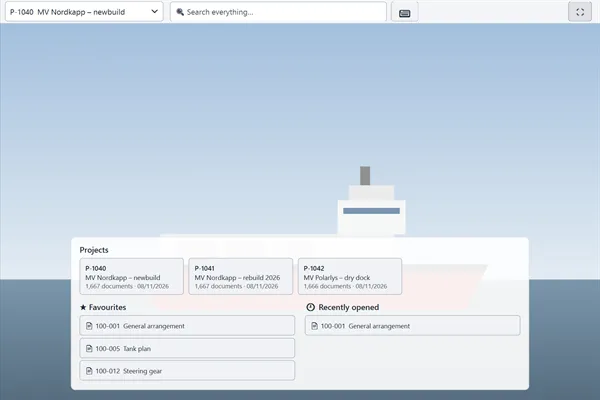
The crew uses Triark ShipDoc on a touch screen in kiosk mode, or on ordinary Windows PCs.
- Synchronizes with Triark EDM when the vessel is online.
- Older revisions are marked as superseded, removed documents as voided.
- Search, or browse by Document, SFI, Zone or folder.
See Triark with your own documents
Tell us how your document flow works today, and we will show you how Triark EDM handles it.